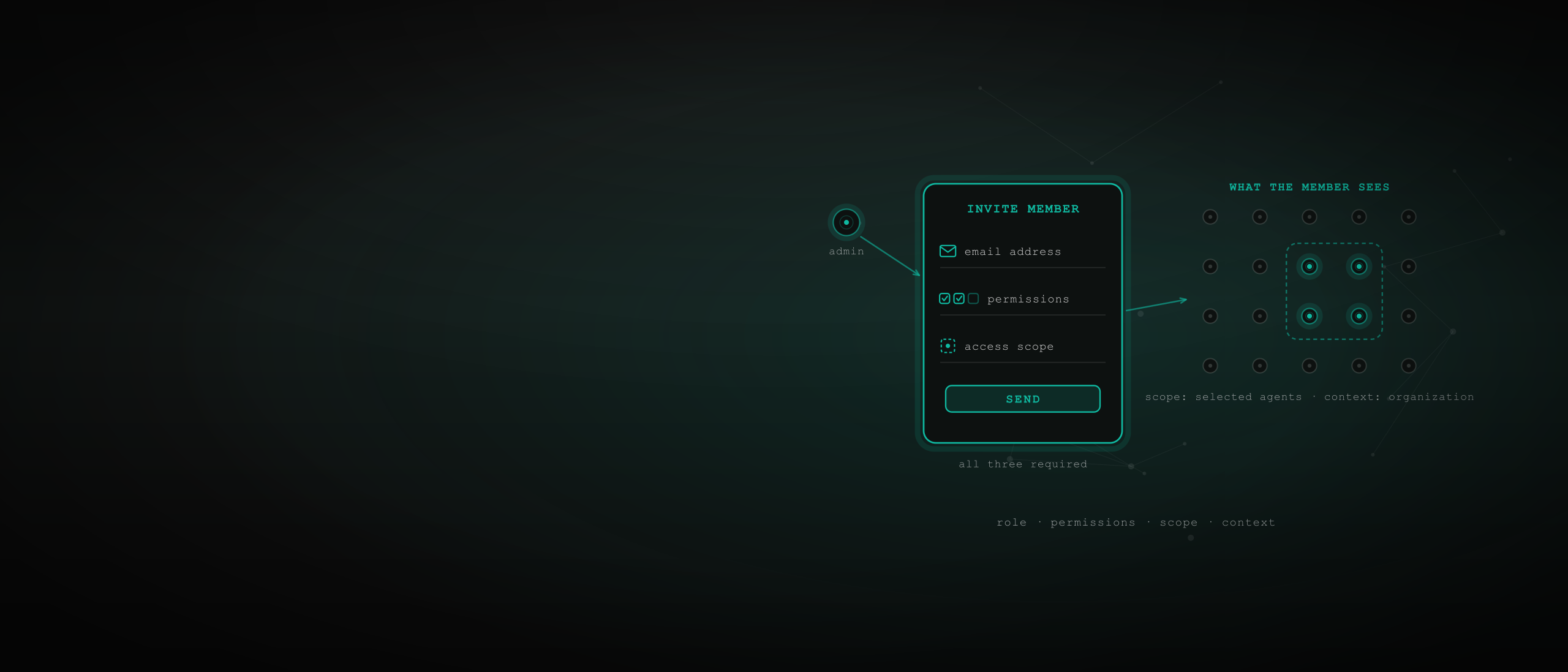
Tragentics controls who can access your AI agents with four composing controls: invite people into an organization with a role — admin or member — explicit feature permissions, and a required access scope, then resolve every request in the member's active context. All four are enforced at the routing layer, on every request, as part of AI agent governance.
What are the four controls that decide who can access an AI agent?
Tragentics gives AI agent access control four composable answers. A role decides who governs. Feature permissions decide what a person can do. Access scope decides what they can see. Context decides which view they are operating in right now.
The role model is deliberately narrow — one admin, one member — because complexity belongs in permissions and access scope, not in a pile of overlapping role labels. You never have to audit a thicket of custom roles to answer "who can touch this agent"; you read one member row. It is the corner of AI agent security most platforms still leave to a single shared login.
The gap this closes is measured, and it is wide: in Aembit's April 2026 survey coverage, 73% of CISOs are critically concerned about AI agent security risks, yet only 30% have mature safeguards in place. The distance between concern and control is exactly this layer.
Control | The question it answers | The options |
|---|---|---|
Role | Who governs the organization | Admin or member |
Feature permissions | What a member can do | Six groups, three presets, per-capability toggles |
Access scope | What a member can see | All agents, selected networks, or hand-picked agents |
Context | Which view they are operating in | Personal or organization |
How do you limit what a team member can do?
On Tragentics, feature permissions are per-member toggles across six groups — Agent Management, Analytics, Protocols, Networks & Canvas, Operations, and Security — so you delegate capabilities, not a coarse role. Three presets (Full access, Limited access, View only) give you a fast starting point; every checkbox stays customizable after.
The model polices its own coherence. Permissions that only make sense for someone who can manage agents are suppressed until Manage agents is on — no member ends up managing credentials for agents they cannot manage. And every permission is enforced at the platform's routing layer on every request: a member without the audit-logs permission doesn't see a hidden button, they get a rejected request. The full matrix lives in permissions and access scopes.
This is the discipline the industry is now demanding for everything with access. Microsoft's July 2026 guidance puts it plainly:
"The right mental model is to treat every agent as a first-class principal: give it a lifecycle-managed identity, assign explicit roles, scope its permissions tightly, and scope tool usage to a preconfigured tools manifest or configuration."
Tragentics applies the same mental model — least privilege — to the humans operating those agents: explicit roles, tightly scoped permissions, by default.
How do you limit what a team member can see?
Tragentics makes access scope a separate, required control. Every member is scoped to all agents, selected networks, or hand-picked agents — and the invite flow does not silently assume "all."
Doing and seeing are different questions, and Tragentics makes you answer both. Permissions without scope would make members too broad; scope without permissions would still let them wander into surfaces they shouldn't use. Composed, they produce exact sentences: this member may manage schedules, but only in these networks. And because each agent is its own non-human identity with a permanent ID, a by-agent scope names exactly the agents it means — not a naming convention that drifts.
Scope is how you set the fleet's blast radius. 99% of organizations have adopted AI agents, and 40% of those agents already reach organizational data. Who can see and drive which agent is not an org-chart nicety — it is the perimeter.
How does organization context change what someone can access?
Every request on Tragentics resolves in a context — your personal view, or an organization you have switched into as a member — and context is not cosmetic: it drives the authorization model. A member's reality is the intersection of three things: active context, feature permissions, and access scope.
The rule that keeps it crisp is the one most platforms miss: admins never switch into their own organization. An admin's personal view already shows everything they own, so there is no "personal but actually org" double-vision to reason about. Members switch in; leaving clears the active context so nobody stays pointed at a view they no longer belong to.
Why care about one switching rule? Because ambiguity about "whose view am I in?" is where team platforms leak. One rule deletes the failure class.
A control that depends on remembering which hat you are wearing is not a control.
How do you onboard and offboard someone safely?
On Tragentics, onboarding is explicit by construction. The Invite Member dialog requires three choices — an email address, at least one enabled permission, and an explicit access scope — and the send button stays disabled until all three are present. There is no "everyone gets full access" shortcut to regret later.
Invites expire in 1 hour, only one pending invite can be active per organization/email pair, and resends are capped at 3 per rolling hour.
The flow is also email-address-first — the invite waits even for someone who hasn't created an account yet, and acceptance creates the membership, its scope rows, and the member's organization context in one step.
Offboarding is symmetric: suspend a member, remove them, or let them leave self-service — membership and scope rows are removed, their active context is cleared, and their personal account is untouched. Compare that to the industry baseline, where only 37% of organizations can revoke an AI agent's credentials: access nobody can cleanly grant is access nobody can cleanly take away. Here, both directions are one deliberate action, and the organization's Activity feed keeps the history.
Frequently asked questions
Can I give someone read-only access to my AI agents?
Yes. On Tragentics, the View only preset grants read-heavy access — analytics and audit logs — without operational control, and you can pair it with any scope: the whole organization, selected networks, or specific agents. Presets are starting points, so every permission checkbox can still be customized per member.
Do organization members see everything in the organization?
No. Three controls decide a member's visibility together: the organization context they are in, the feature permissions they hold, and the access scope set for them. Scope can be as narrow as hand-picked agents, so a member can be inside the organization and still see only the resources the admin chose to expose.
Can an admin switch into their own organization?
No — and that is deliberate. An admin's personal view already shows everything they own, so Tragentics reserves context switching for members. The rule prevents the confusing double-vision of "personal but actually org" views and keeps authorization crisp: admins govern from ownership, members operate under delegation.
How do I remove someone's access to my agents?
Three ways: suspend the member so they stay recorded but stop operating, remove them from the Members tab, or let them leave self-service from their own settings. All three end the member's organization access; leaving also clears their active context. Their personal account and personal agents are untouched.
Does Tragentics support SSO for organizations?
Yes — SSO (SAML) is configured per organization by the admin, offered as an add-on rather than a default inclusion. It layers enterprise sign-in on top of the same role, permission, and scope model, so how people authenticate changes while what they can access stays exactly the same.